Showing posts with label NSDL (RPU). Show all posts

Sunday, December 21, 2014

e-TDS :- New NSDL RPU 4.2 with New FVU Version 4.5 & 2.41

Friends,   NSDL has launched new TDS RPU (Return Preparation Utility) 4.2 with new FVU (File validity Utility) version 4.5 & 2.41.  This is free facility provided by Income Tax Department for their deductors/collectors  to submit or prepare TDS statement is time.  


Download NSDL free Software RPU 4.2 (Click Here)
(Latest FVU.exe Verstion 4.5 & 2.41 are also available in above link)

Zero Uploading Charges 
                  This has already been published that there is no charges for uploading online TDS statements at NSDL.  NSDL has generated their NODAL centers who charge uploading FEEs fixed by NSDL.  But in the second hand, NSDL has also provided online facility to submit TDS return which is totally free of cost.  It is not only imagine but also true for Digital Signature Holders.   

Important Links for e-TDS 
                           Click on e-TDS picture available in the top left at www.tdstaxindia.com to get important TDS related links.   ZERO UPLOADING CHARGES instructions is also available in it and details of other links are also given below in the interest of deductors or collectors. 
  • Latest NSDL Free RPU 4.2
  • Nil TDS Return or Declaration for Non-Return 
  • TDS Rates 
  • TDS Excel Based Calculator 
  • Due Dates
  • Challan No. 281 
  • Challan Correction Mechanism
  • Challan Status Enquiry 
  • Java Download 
  • Value of Flags 
  • Online Upload TDS FVU without help of Nodal Centre 
  • TRACES-PDF-Converter V 1.3 L for Form 16 or Form 16A 
  • Download Justification Report 
  • FAQ (Frequently Asked Questions

Friday, January 3, 2014

e-TDS : - New RPU 3.8 applicable w.e.f 04.01.2014 with Form 27A utiltiy

Friends
                NSDL has provided new TDS RPU  3.8 which is applicable w.e.f. 04.01.2014 as mandatory.  Major amendments have been done in this tds RPU 3.8 like discontinuation in deletion of deductee record , Automatic Generation of Form 27A and changes in challan detail etc.  Mainly Auto Form 27A generation is main feature in the interest of  NSDL RPU user's.  Now no need to go anywhere to generate form 27A.  As we create file the same is available in same folder where fvu file is generated. 


Key features of RPU 3.8

--- 1. Deletion of deductee record: Feature to delete the deductee record has been discontinued and as a result delete option available under “Updation mode for Deductee” has been removed. In case the user wishes to nullify a deductee record/ transaction, he is required to update the amount and related fields to “0” (zero) and add new record with updated values.

--- 2.Date of deduction: Date of deduction in deductee record should not be that of previous quarter. Example if the statement pertains to Q3 of FY 2013-14, then the date of deduction should not be lower than 01/10/2013.

--- 3.Generation of Form 27A: New feature has been enabled wherein Form 27A is generated on validation of statement by TDS/TCS FVU.

--- 4.Heading of column no. 20 under Challan details has been changed as “Interest to be allocated/apportioned”.

--- 5.Incorporation of latest FVU Version 4.1 and 2.137.

--- 6. Applicability of FVU version: FVU version 4.0 and 4.1 are applicable upto January 03, 2014 and from January 04, 2014 FVU version 4.1 would be mandatory

Click here to Download TDS RPU 3.8

Friday, September 27, 2013

e-TDS :- New RPU 3.7,FVU 4.0,FVU 2.136 (applicable w.e.f. 1.10.2013) released

NSDL has released new RPU 3.7 with new FVU 4.0 or FVU 2.136 which is applicable w.e.f. 1.10.2013.  The file saved in RPU 3.6 will not be opened in RPU 3.7 due to it's new structure.  Error message is "Selected file is not compatible for RPU version 3.7.  The said message display that you have used old RPU in creation of TDS/TCS file. The  major modifications have been done in the RPU 3.7.  


Key features of RPU 3.7 (applicable w.e.f. 1.10.13)


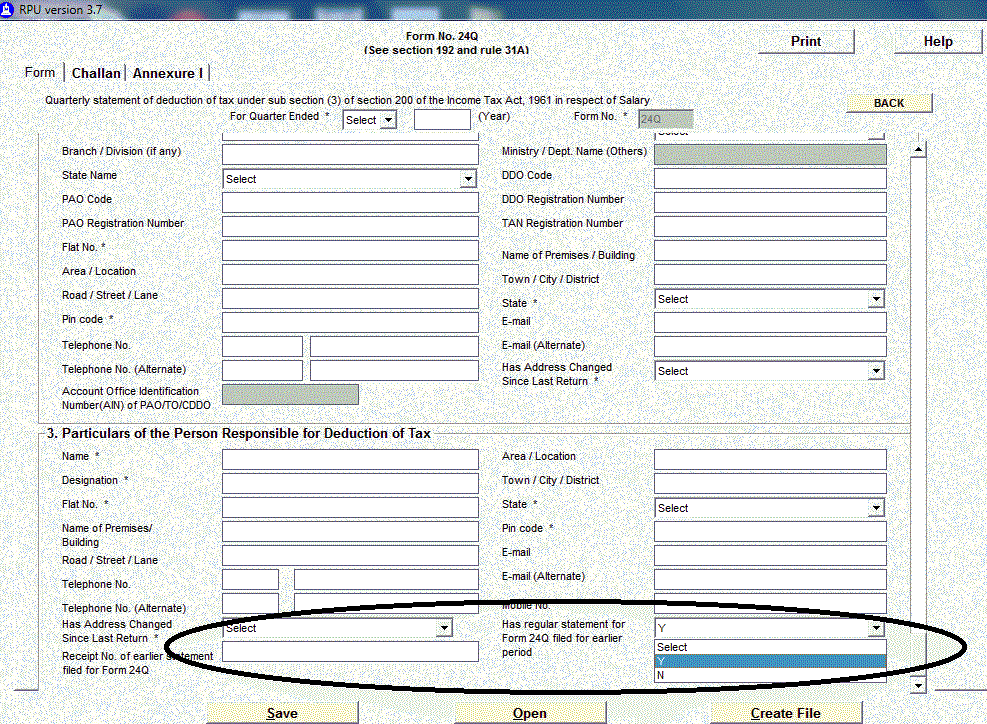
·         Two new fields as below have been added for regular TDS/TCS statements pertaining to all financial years:

1)      Has regular statement for Form XXXQ filed for earlier period – Here deductors are required to select from the drop down, ‘Yes’ if regular statement for Form 24Q or 26Q, 27Q or 27EQ (as applicable) has been filed earlier, otherwise ‘No’ value to be selected.

2)      Receipt No. of earlier statement filed for Form (24Q/26Q/27Q/27EQ) – In this field deductors who have filed regular statement earlier period (for the said Form no.)  are required to mandatorily quote 15 digit provisional receipt number of immediate previous TDS/TCS statement filed.

·         New section code 194LD (i.e. 4LD in RPU) has been incorporated in RPU 3.7 for Form 27Q. This Section code will be applicable for regular and correction statements pertaining to FY 2013-14 onwards.

·         Update allowed for Provisionally booked Transfer voucher: Provisionally booked transfer vouchers are also allowed to update on fields ‘Form 24G receipt No.’, ‘Date on which tax deposited’ and ‘DDO/Transfer Voucher Serial No.’.
·         Incorporation of latest FVU Version 4.0 and 2.136.

------------------------------------------------------------------------------------------------------------
Key feature of FVU version 4.0 (applicable w.e.f. 1.10.13)

·         Change in validation of Section code 194LC:
o   Section code 194LC will be applicable only for deductor category (as per the statement) “Company” and “Branch of Company”.
o   This validation will apply for regular and correction statements.

·         Incorporation of new section code 194LD: This Section code will be applicable for:
o   Regular and correction statements pertaining to FY 2013-14 and onwards.
o   Statement pertaining to Form no. 27Q.

·         Nil challans/transfer vouchers with deductee record: Validation as below will be applicable:
o   Nil challans/transfer vouchers need to mandatorily have deductee records.
o   In deductee records, flag in the remarks for lower or non-deduction should be “A”, “B”, “Y”, “S”, “T” or “Z” (as applicable).
o   This validation will apply for regular and correction statements.

·         Last provisional receipt number to be quoted in regular TDS/TCS statements: Deductors are require to mandatorily quote the last accepted provisional receipt number of the regular quarterly TDS/TCS statement.

·         Date of deposit of Non-nil Challan: Validation for Date of deposit of non-nil challan has been relaxed. This date can pertain to immediate previous financial year of the statement.
·         FVU version 3.9 and 4.0 are applicable upto September 30, 2013. Further, FVU version 4.0 would be mandatory from October 01, 2013.

------------------------------------------------------------------------------------------------------------
Key features of FVU version 2.136 (applicable w.e.f. 1.10.13)
·         Nil challans/transfer vouchers with deductee record: Validation as below is applicable:
o   Nil challans/transfer vouchers need to mandatorily have deductee records.
o   In deductee records, flag in the remarks for lower or non-deduction should be “A” or “B” (as applicable).
o   This validation will apply for regular and correction statements.

·         Last provisional receipt number to be quoted in regular TDS/TCS statements: Deductors are require to mandatorily quote the last accepted provisional receipt number of the regular quarterly TDS/TCS statement.

·         Date of deposit of Non-nil Challan: Validation for Date of deposit of non-nil challan has been relaxed. This date can pertain to immediate previous financial year of the statement.
·         FVU Version 2.135 and 2.136 are applicable upto September 30, 2013. Further, FVU version 2.136 would be mandatory from October 01, 2013.
RPU 3.7      (Click Here)
FVU 4.0      (Click Here)   
FVU 2.136  (Click Here)
Old RPU     (Click Here)

Tuesday, January 31, 2012

e-tds/e-tcs NSDL RPU in Windows 7

HOW TO RUN ETDS NDSL RPU IN WINDOWS -7

Friends,  If your operating system is Windows 7 in you desktop or laptop and want to run NSDL e-tds/e-tcs  Return Preparation Utility (R.P.U.).  In general, after installation/setup of software, it does not work in Windows 7, whereas  there is no difficulty in Windows XP etc. 

Don't worry, running of  e-tds/e-tcs NSDL RPU works in Windows 7 but installation requires some knowledge.  Simply right click on setup file and use "Run as Administrator" (as shown in below picture) and install.  After that NSDL RPU works normally. 


Second Trick to install the NSDL RPU having Administrator rights
Follow below steps :-
  • You must have Administrator rights
  • Go to Control Panel -> User Accounts -> Click on "Change User Account Control Settings"
  • Set to "Never Notify"
  • Now re-install your software and you will be able to install successfully..
In case you have any query regarding NSDL e-tds/e-tcs RPU, you may ask through Comment on this post using "Post a New Comment " link. We will try to resolve your query if possible.  

Intense Debate Comments