Showing posts with label 16A from TXT. Show all posts

Saturday, May 3, 2014

Income Tax :- Part A of TDS Form 16 updated in Excel Calculator

Friends,   Now it is time to submit TDS return upto 15-05-2014 for Non-Government Deductors and 31-05-2014 for Government Deductors.   Deductors should submit their return in time to avoid Late filing Fee under section 234E.  In case deductors are facing some problem in their data they should submit either partial or Nil-Return as 24Q4 in time so that Late Filing fee may not be charged by Income Tax Department and further correction can be done as required. 

              Second step after filing TDS return is issuance of TDS certificate in Form 16.   After addition two new fields like Reported income of previous employer or Reported Tds with previous employer in calculator sheet, Form 16 was not working properly.  Now the same has been updated accordingly and can be used as Form 16 Part A.  The same is also not mandatory to download from tdscpc.gov.in (TRACES)

Download Calculator link is available in Free Download link at this website.

Monday, April 22, 2013

New Circular regarding issuance of TDS Form 16

CIRCULAR NO. 04/2013
F.No 275/34/2011-IT(B) 
Government of India 
Ministry of Finance 
Department of Revenue 
Central Board of Direct Taxes 
New Delhi, the 17th April, 2013 

Sub: Issuance of certificate for tax deducted at source in Form No. 16 in accordance with  the provisions of section 203 of the Income-tax Act, 1961 read with the Rule 31 of the  Income-tax Rules 1962 -- regarding 

1. Section 203 of the Income-tax Act 1961 (“the Act”) read with the Rule 31 of the Income-tax Rules 1962 (“the Rules”) stipulates furnishing of certificate of tax deduction at source (TDS) by  the deductor to the deductee specifying therein the prescribed particulars such as amount of TDS,  valid permanent account number (PAN) of the deductee, tax deduction and collection  account number (TAN) of the deductor, etc. The relevant form for such TDS certificate is Form  No. 16 in case of deduction under section 192 and Form No. 16A for deduction under any other  provision of Chapter XVII-B of the Act. TDS certificate in Form No. 16 is to be issued  annually whereas TDS certificate in Form No. 16A is to be issued quarterly. TDS  Certificate in Form No 16 as notified vide Notification No. 11/2013 dated 19.02.2013 has  two parts viz Part A and Part B (Annexure). Part A contains details of tax deduction and  deposit and Part B (Annexure) contains details of income. 

2. With a view to streamline the TDS procedures, including proper administration of the Act,  the Board had issued Circular No. 03/2011 dated 13.05.2011 and Circular No. 01/2012 dated  09.04.2012 making it mandatory for all deductors to issue TDS certificate in Form No. 16A after  generating and downloading the same from “TDS Reconciliation Analysis and Correction  Enabling System” or (Error! Hyperlink reference not valid., previously called TIN website. In exercise of powers under section 119 of the Act, the Board has  now decided as  following:- 

2.1 ISSUE OF PART A OF FORM NO. 16 FOR DEDUCTION OF TAX AT SOURCE  MADE ON OR AFTER 01.04.2012:
All deductors (including Government deductors who deposit TDS in the Central Government  Account through book entry) shall issue the Part A of Form No. 16, by generating and  subsequently downloading through TRACES Portal, in respect of all sums deducted on or after  the 1st day of April, 2012 under the provisions of section 192 of Chapter XVII-B. Part A of  Form No 16 shall have a unique TDS certificate number. 

2.2 AUTHENTICATION OF TDS CERTIFICATEIN FORM NO. 16:  
The deductor, issuing the Part A of Form No. 16 by downloading it from the TRACES  Portal, shall, before issuing to the deductee authenticate the correctness of contents mentioned therein and verify the same either by using manual signature or by using digital  signature in accordance with sub-rule (6) of Rule 31. 

2.3 In other words, Part A of Form No. 16 shall be issued by all the deductors, only by  generating it through TRACES Portal and after duly authenticating and verifying it. 

2.4 ‘Part B (Annexure)’ of Form No. 16 shall be prepared by the deductor manually and  issued to the deductee after due authentication and verification alongwith the Part A of the Form  No. 16 stated above. 

2.5 Sub rule (3) of rule 31of the Rules sets the time limit for issuance of Form 16 by the  deductor to the employee. Currently, Form 16 should be issued by 31st May of the financial Year  immediately following the financial year in which income was paid and tax deducted. 

3.1 The Director General of Income-tax (Systems) shall specify the procedure, formats and  standards for the purpose of download of Part A of Form No. 16 from the TRACES Portal and  shall be responsible for the day-to-day administration in relation to the procedure, formats and  standards for download of Part A of Form No. 16 in electronic form.  

3.2 It is further clarified that Part A of Form No. 16 issued by the deductors in accordance with  this circular and as per the procedure, formats and standards specified by the Director General of  Income-tax (Systems) and containing Unique Identification Number shall only be treated as a  valid compliance to the issue of Part A of Form No. 16 for the purpose of section 203 of the Act  read with rule 31 of the Rules. 

4. Hindi version shall follow. 
-sd- 
(Anshu Prakash) 
Director (Budget) 
Central Board of Direct Taxes 
     
     Copy to: 
  1. The Chairperson, Members and all other officers of the CBDT of the rank of Under  Secretary and above 
  2. All Chief Commissioners of Income-tax (CCA) & All Directors General of Income-tax 
  3. The Director (PR, PP & OL), Mayur Bhawan, New Delhi for printing in the quarterly tax  bulletin and for circulation as per usual mailing list (100 copies) 
  4. The Comptroller and Auditor General of India (40 copies) 
  5. All Directors of Income Tax, New Delhi; 
  6. All CsIT (TDS) 
  7. The Director General of Income-tax, NADT, Nagpur 
  8. Guard file 

‐sd‐
(Anshu Prakash) 
Director (Budget) 
Central Board of Direct Taxes

Form  16 from NSDL RPU 3.2 directly (Click Here)

Thursday, April 18, 2013

e-TDS :- Auto generation of Form 16 and 16A from .txt file


Earlier Form 16 generation utility  was created on .fvu based which contains normal data.  But now fvu file  contains encrypted data which can not be read by any other programme.  Therefore to make it familiar in  future.  This utility has been updated on the basis of .txt file.   It means now this utility is compatible with .txt file generated by  latest RPU 3.2 version. 

Form 16 AND 16a are TDS Certificate or an Evidence of Tax Deduction at Souce


Easy working in Windows XP/98


Demo Copy updated on 18-April-2013

Now, No requirement of Microsoft Office Excel
or
Any other data base programme.
No Macro Problem/Any other Warning


Utility of This Software
  • Easy generation of Form 16 and 16A.
  • No special  time is required is  in  generation of Form 16 and Form 16A
  • Accuracy of forms depends upon data available in TXT file. 
  • There are options to change in Pan Numbers when e-tds/e-tcs return submitted having PAN  showing  PANNOTAVBL or PANAPPLIED.
  • In case two or more deductees showing  PANNOTAVBL or PANAPPLIED.  User is required to change PAN numbers  as unique Pan Number.  Software generates Forms on the basis of Pan Numbers.
  • During process of programme  use Control+W key  next/new screen.
Procedure of Installation:-

  • First of all , Place zip file in  C:\ drive  and extract. 
  • After that place txt files in fvu folder  = \e-tds\fvu\. 
  • Name of  txt files should be Q1.fvu, Q2.fvu,Q3.fvu, Q4.fvu. (keep in mind that Q1.txt.fvu will not be accepted.)
    (To View complete extension code  follow the steps given as under : -
    Start > Control Panel > Tools > Folder Option > View > un-tick "Hide extension for known file types"


Picture View for easy installation :-

     1) Zip File will be sent through email


2) exe file after extract of above zip file.   It is your software.


For Installation of software in your computer:-

On clicking above exe file, This picture will be appeared  on your screen and Destination folder should be c:\ as shown in picture.


3) Software will be displayed as c:\e-tds  shown in picture.


After clicking the 16.exe or 16a.exe file , The following screen will be displayed at your monitor.

Have You placed New Fvu files ="Y"
If option is "Y" then the following picture will display at your monitor otherwise 16a forms will be created with old data/old fvu files.

Do strictly as per given in pictures.

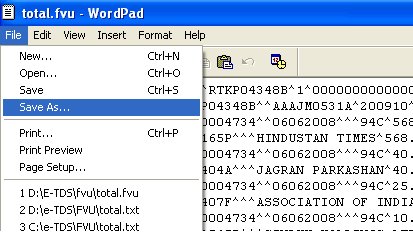
Picture-1


Click Save As Button as shown in Picture Number -1
------------------------------------------------------------------------------------------------


Picture 2  (File Name should be appeared as Total.txt not only Total)


(File Name should be Total.txt
Don't leave only file Name = Total )
Now Change Save as type =Text Document-MS DOS Format as Picture-2


------------------------------------------------------------------------------------------------
Picture-3


Now Click on Exit from the Word Pad as shown In Picture -3


At present your programme may be minimized, Click on minimized e-tds or press CTR+enter to restore your programme.

Now a screen will be displayed having list of Pan Numbers = Pannotavbl, you can correct these numbers otherwise all pannotavbl will be grouped and will print a single form 16 or 16a for all PANNOTAVBL Data.

After that you can save this with pressing CTRL+W or CTRL+end.
Now a next screen will be displayed for Tan Holder Data available in TXT file. If there are some corrections (Tan,Pan,Address,Name of Deductor,Designation, Place and date of Issue of form) , you can change it Here.
Now your forms are ready in output folder as Disp.prt file 


Setting of Printing of Forms

  • Direct Printing is available in Dot Matric Printer.
  • Forms will be available Microsoft  word programme.
  • Laser/inket printing is also available after minor setting i.e.  open Micro Soft Word and select the  file disp.prt available in folder  \e-tds\output\disp.prt and set margin as below
  • 27A form can also be generated of the fvu file or fvu generated by NSDL Software.
Top= 0 , Right = 0 and Bottom =0 and save

Delivery of Software :- 
          Software will be provided  through email  with in 2 working days after confirmation of payment.

Support:-
          Through email at easyjain@gmail.com or rkj_zen@yahoo.co.in


Other Facility  

  • Excel based form 16 and 16a are free of cost.
  • Form 27A creation software from txt  is free.
  • List of CIT Addresses is also available in e-tds.
Mode of Payments :-

  • Rs.1000/- (Cheque or Transfer or E-payment) for one Tan.
  • Rs.1050/- (Cash Deposit including  Bank Charges) for one Tan.


Payment Terms :- Advance 
  • Bank         =State bank of india
  • Branch      = MDU Branch
  • City        =Rohtak 
  • Pin Code = 124001
  • BSR Code =  0004734 
  • IFSC Code: SBIN0004734 
  • Bank Account Number :- (will be provided on Phone 09896124627), City = Rohtak.


(Demo copy will create only one form of form 16 and 16a)
Demo Copy updated on 18.04.2013
Along with New Format of  Form 16 and 16A which is applicable w.e.f. 01.04.2010

Click here to know regarding etds return

New Form 16 and 16A in Excel Format (click here) Applicable w.e.f. 01.04.2010


Intense Debate Comments